


Estimated reading time: 7 minutes
Watch Video
Amazon DynamoDB Accelerator (DAX) is a fully managed, highly available, in-memory caching service specifically designed to enhance Amazon DynamoDB performance. It is ideal for read-heavy applications that require extreme speed, such as real-time gaming, bidding platforms, and high-traffic retail sites.

Let us deep dive
- Performance: A fully managed, in-memory cache that boosts DynamoDB read performance by up to 10x, reducing latency from milliseconds to microseconds even at millions of requests per second.
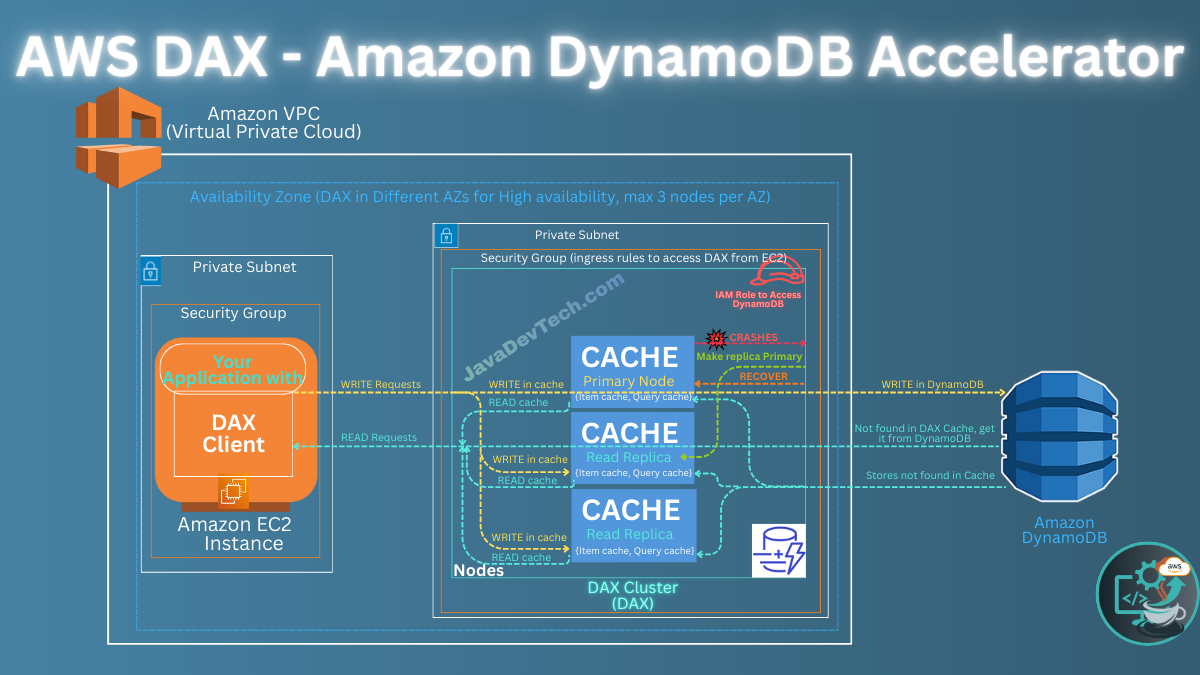
- Integration: Tightly integrated and API-compatible with DynamoDB as DAX is compatible with existing DynamoDB API calls, no application logic modification is required. you can point existing API calls to a cluster using the DAX SDK (DAX client) without changing application functional code. You deploy your application (with the DAX client) on the EC2 instance. At runtime, the client directs all of your application’s DynamoDB API requests to the cluster. If DAX can process one of these API requests directly, it does so. Otherwise, it passes the request through to DynamoDB.
- Functionality: Natively handles read-caching, cluster management, and data population automatically.
To use Amazon DynamoDB Accelerator (DAX), you create a cluster within your Virtual Private Cloud (VPC) and modify your application to use the client SDK to point to the cluster endpoint. No application logic changes are required because DAX is API-compatible with DynamoDB.
DAX Setup and Configuration
Create a DAX Cluster
By using either the AWS Command Line Interface (AWS CLI) or the AWS Management Console. Navigate to the DynamoDB console and create a new DAX cluster. A DAX cluster can support up to 11 nodes per cluster (the primary node plus a maximum of 10 read replicas).
Nodes

- Specify the node type, node family, and number of nodes (a minimum of three nodes in different Availability Zones is recommended for production).
- Each node runs its own instance of the DAX caching software. One of the nodes serves as the primary node (Provide cached data, write operations, Evicting data from the cache) for the cluster. Additional nodes (if present) serve as read replicas (Provide cached data, Evicting data from the cache).
Item Cache and Query Cache
The nodes manages two kind of caches

- The Item cache, which stores results from the READ DynamoDB API calls like GetItem, BatchGetItem operations.
- The Query cache, which stores results from Query, Scan operations.
Subnet Groups
- Access to DAX cluster nodes is limited to applications running within an Amazon VPC environment. To manage this, you must define a subnet group—a collection of subnets (often private) within your VPC—which DAX uses to assign IP addresses to its nodes.
Security Groups

- A security group acts as a virtual firewall for your VPC, allowing you to control inbound and outbound network traffic. After you add this rule to your security group, the applications that are running within your VPC can access the DAX cluster.
IAM Roles

- Create or select an appropriate AWS Identity and Access Management (IAM) role and policy that grants the DAX cluster permissions to access your DynamoDB tables.
Configure Your Application for DAX

- Integrate the DAX client SDK into your application (available for Java, Python, Node.js, .NET, and Go).
- Modify your application’s configuration to use the DAX cluster’s endpoint instead of the DynamoDB endpoint.
DAX READ Operations
DAX is a read-through/write-through cache designed primarily to accelerate read-heavy, eventually consistent workloads, reducing response times from milliseconds to microseconds.
Cache HIT

Now lets see how READ operations work in case there is a HIT in the cache.
- Its simple, DAX provides the data to the application from its cache without interacting with the DynamoDB.
- Since DAX is API-compatible with DynamoDB, existing READ DynamoDB API calls like
GetItem,BatchGetItem (results from these both operations will be stored in the ITEM Cache by DAX)andQuery,Scan(results from these both operations will be stored in the QUERY Cache by DAX)will automatically leverage the cache.
Cache MISS

Now lets see how Read operations work in case there is a MISS in the cache.
- Its also simple, this time DAX route the request to DynamoDB and provides the results to the application.
- In addition, DAX stores those results in the cache.
DAX WRITE Operations
Lets see how write operations work.

- When your application writes data, DAX intercepts the write, the primary node writes the item to the DynamoDB first, and then updates its internal cache (write-through cache) on all nodes to ensure consistency.
- This can be done by the WRITE DynamoDB API calls like BatchWriteItem, UpdateItem, DeleteItem, PutItem without functional code changes in your application.
Node Recovery
What about high availability, Fault tolerance?
What if the primary node fails?

- DAX automatically fails over to a read replica and designates it as the new primary node.
- If a replica node fails, other nodes in the DAX cluster can still serve requests until the failed node can be recovered.
- For maximum fault tolerance, you should deploy read replicas in separate Availability Zones.
DAX Usage and Best Practices
- Consistency Model:
- By default, DAX provides eventual consistency for read operations.
- If your application requires strongly consistent reads, the client automatically passes those requests directly to the underlying DynamoDB table and does not cache the results.
- Monitoring: Regularly monitor your cluster’s performance using Amazon CloudWatch to view metrics such as cache hits, misses, and error counts to ensure optimal operation and identify potential bottlenecks.
- Security: Ensure DAX is securely encrypted at rest and in transit, and use IAM roles and policies effectively to manage access. A security group acts as a virtual firewall for your VPC, allowing you to control inbound and outbound network traffic. When you launch a cluster in your VPC, you add an ingress rule to your security group to allow incoming network traffic. The ingress rule specifies the protocol (TCP) and port number (8111) for your cluster. After you add this rule to your security group, the applications that are running within your VPC can access the DAX cluster.
- High Scalability: You can scale your cluster horizontally by adding read replicas to handle increased read traffic.
- High availability. In the event of a primary node failure, DAX automatically fails over to a read replica and designates it as the new primary. If a replica node fails, other nodes in the DAX cluster can still serve requests until the failed node can be recovered. For maximum fault tolerance, you should deploy read replicas in separate Availability Zones.
Leave a Reply